
|
Conducting research — and getting it published — is not for the faint-hearted. Authors and publishers demand attention to detail throughout a project’s many interconnected parts. Wouldn’t it be something if software would address this complex conjunction of needs though a single application, a single interface, and with all needed components coordinating in the same project? |
NOTA BENE The Nota Bene Workstation is the multi-component integrated solution that unifies every scholarly task through a common interface in a single program.
|
      |
OPUS
———————————————— DOCUMENT-PROCCESING CORE Note Bene’s word-processing component does fancy things no other program does — it offers three independent series of footnotes (so you can create a critical edition of a medieval manuscript), more cross-referencing options than you can imagine, and professional back-of-manuscript indexing. When you add built-in academic styles, frameworks/outlines, academic research tables, and more, you understand that you now have capabilities not available anywhere else. But it is in simplifying complex formatting tasks that Nota Bene excels. For example, use the keyboard shortcut, or click the icon, to create a block-indented quote, and all the multiple components involved in the required layout are taken care of — inter-paragraph spacing above and below the quote, margins, and internal line-spacing, even whether or not the paragraph subsequent to the quote should be indented or not — so you can simply continue writing. We understand completely that your time should be spent in creating documents, not in formatting them. Nota Bene offers built-in support for the Greek, Arabic, Hebrew, and Cyrillic alphabets, while also providing a wide range of IPA and other extended Roman-alphabet characters, making it possible for you to work — more easily, and with greater control and higher-quality output, than in any other program — across every Nota Bene module: you can add a bibliographic entry in Greek, or search for Arabic words in Orbis, or create a multi-column table in Arabic, Hebrew, and Russian. (These capabilities were previously available only in a separate add-on module called Lingua, but are now included in the Workstation.) |

|
|
|
IBIDEM
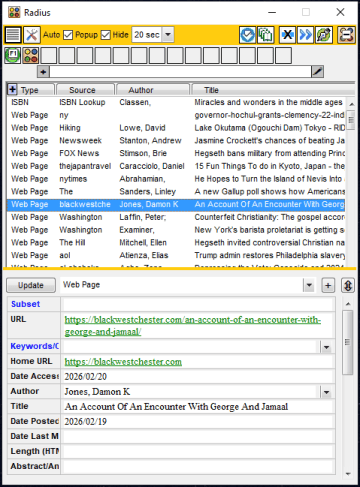
—————————————— INCLUDED IN WORKSTATION Ibidem is Nota Bene's powerful bibliographic database and citation system. Enter a record once (or let Archiva harvest records for you), and it will be accessible your entire career. You can search (on 32 fields at once!), sort, and produce reports using all of the word processor's power (including outputting to tables). Ibidem excels in citing references and building end-of-document bibliographies in real time as you add, move, or delete citations, whether full form, shortened subsequent forms, using ibid., or more. Ibidem generates them automatically on the fly. Do you need to submit the paper to another journal that uses a different style? Simply select the style (from among hundreds), and with a few clicks your entire document's citation apparatus will be reformatted. (For example, citation-only notes will convert to and from in-text citations.) And now Ibidem comes in two ways — a full version that makes everything immediately accessible (top image), and a "pop-up" mode that offers Ibidem's essential elements in a compact, floating pane (bottom image) that is perfect not only for users who operate on more restricted screen sizes, but for anyone who wants an unimpeded view of both the document and the citation/reference apparatus. To add extraordinary power to common research activities, Ibidem records support links of all kinds — to on-line sources (web pages, including PDFs), local copies of those, images, and note-taking files. Note-taking files are full Nota Bene documents in which you take notes, save quotations, and engage in arguments relevant to the source text. Best of all, every note-taking file can become part of Orbis's universe. |


|
|
|
ORBIS
—————————————— INCLUDED IN WORKSTATION Orbis is unequalled in its abilities to search and retrieve all content. Its no-effort, no-tag, form-free coding/ annotating speeds up search and retrieval of discriminate portions of documents. And once it's identified those elusive passages, it shows them to you in a simple-to-read keyword-in-context table view, with the selected match (which can be expanded in context, all the way up to the entire file) shown below, ready for single-key insertion into your open document. (If that fragment is from a note-taking file linked to an Ibidem record, that source will be automatically brought with it, making sure that everything is properly attributed!) Whether searching for words or phrases, alone or in Boolean combinations (where the results are shown in a useful tree-structured diagram), and whether using the precise terms or expanding the search with synonyms, Orbis can find what matters for you. Instantly. And it's not only your Nota Bene files. You can search everything — PDF files, saved (HTML) web pages, and Word (DOCX/DOC/RTF) and other DOCX files on your computer . Everything on your computer becomes part of this expanding circle: by seeing how words are used, and arguments made, across thousands of documents, you then see things in a different light, and your reshaped argument/text itself becomes part of this — your — expanding knowledge base. (The ability to search PDF files, saved web pages, and DOCX files was previously offered only in a separate add-on module known as Orbis+, but these capabilities are now included as part of the Workstation.) |
YOUR DIGITAL HERMENEUTICAL CIRCLE 
|
|
|
MATRIX
—————————————— INCLUDED IN WORKSTATION Matrix is an all-purpose database that uses the Ibidem database engine to let you keep track of anything — a record collection, or anthropological field notes, or names and addresses. It offers all of Ibidem's power — it can handle many hundreds of thousands of records, search 32 fields at time, sort in almost every way imaginable, and show thumbnails of all the kinds of files — images, PDFs, web pages, and more — linked to a record. But perhaps the most remarkable thing is how easy it is to create reports (with a popup field selector) of the most sophisticated kind — you can use every Opus formatting option, from tables to graphics to notes. You can easily create labels of virtually every kind, aided by another kind of magic — there are even tools that let you check that the addresses all fit in the allotted number of lines! (Matrix greatly expands the non-bibliographic database capabilities previously included in a module called IbidPlus that was part of the Workstation, replacing it.) |
|
|
|
ARCHIVA
—————————————— INCLUDED IN WORKSTATION The Nota Bene Workstation now includes components of Archiva that assist you in building your Ibidem library by including both works found in an Archiva search of on-line libraries (over 500 are included) as well as citations captured from web pages such as JSTOR, Project Muse, EBSCO, and selected other aggregators. |

Note: the first few options shown in the Archiva dialog are included in the Nota Bene Workstation; the others shown are features of Archiva+ |
|
ARCHIVA PLUS
————————— ADD-ON MODULE Archiva+, a new add-on module, extends the built-in Archiva's record-creating functions to include conversion of digital versions of formatted bibliographies (in five major styles) into structured Ibidem records, as well as the ability to build bibliographic records from ISBN numbers, both from well-structured lists, or by extracting them from within free-form text files
|
|
Taken together, these tools can fundamentally reshape your work — simplifying the tedious, and opening up creative possibilities.
AUTOMATION — SPEED and CONSISTENCY Select the needed academic style at the time of creating a document. And with that, every element of that style is now embedded. No messing around in mid-document with settings to suit needed changes in layouts: every type of paragraph is automatically formatted, with line-spacing, indentation, margins, heading size and location, block quotes, all handled automatically. References are formatted instantaneously as they are cited; pasted citations are automatically re-formatted; bibliographies are auto-generated in real time. Non-standard sources (e.g., unpublished archival manuscripts) are cited according to one-time entry of user’s specialized requirements. And if a different academic style is needed, one click will re-format every element of the document to conform to the newly selected style. Automation throughout: from Front Matter to Back Matter. CONFIDENCE IN EVERY MOVE We recognize that our job begins from the moment you start Nota Bene. We know that your job is to research, create, write, and that ours is to facilitate, to automate. Thus Nota Bene incorporates facilitators to nurture your user confidence, providing brief pop-up tips, as needed, in real-time to explain the program’s action and guide your selection every step of the way. As you become familiar with the interface, these Info Tips can be turned off individually or comprehensively. |