
|
|
|
Nota Bene 13 includes a cornucopia of new delights, with streamlining of existing features and advanced new conveniences that should make Nota Bene even more useful to you:
|

|
Simplifications everywhere make the program easier to use
|
|
| 
| 
|
A completely re-engineered Ibidem is more elegant, more powerful
|
|
| 
|
|
A new popup Ibidem makes citing and editing of citations easier than ever
|
|
|
| 
|
New research tables are consistent with academic styles required by publishers
|
|
|
| 
|
A radically improved Mac version will delight Mac users
|
|
|
| 
|
Web research is now easier than ever, with major enhancements to Archiva
|
|
| 
|
|
Read on to discover how these enhancements, and others, can make a difference in your work. |
|
|
NB 13 includes an all-new Ibidem interface. Among other things (this is just a very short list of only a couple of the hundreds of changes):
 |
|
|
Ibidem has been radically enhanced:
|
|
|
There is a new popup “mini” Ibidem dialog (on Ctrl+F7):
|
|
|
|
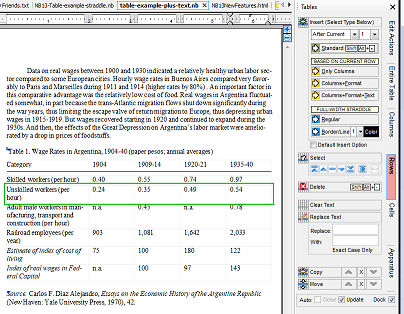
NB 13 now supports three different kinds of tables:
|
|
COLUMN OPTIONS: • Set Layout • Add/Insert • Delete • Copy • Move • Clear Text • Replace Text (only in current column) |

|
|
ROW OPTIONS: • Insert Regular Row › New › Based on Current (text +/- format) • Insert Straddle Row › Regular (Full Height) › Border Line (set color & thickness) • Delete • Copy • Move • Clear Text • Replace Text (only in current row) |
|
|
As for tables themselves, they can be:
|
|
|
New academic research tables have been added:
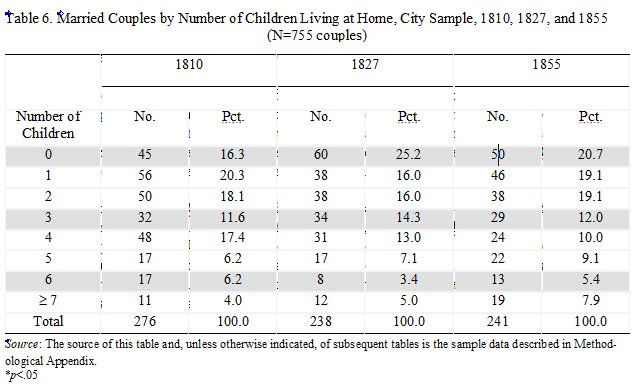
In addition to the generic capabilities described above, which apply to all three kinds of tables, these research tables:
|
|
|
|
NB 13 runs on Catalina and Big Sur and on computers with Apple’s new M1 chips. Beyond this major change, efforts have gone into improving the NB experience on all Mac systems on which NB runs:


|
|
|

Archiva, Nota Bene’s add-on module that captures and converts bibliographic data ,has been enhanced. Users with Archiva will discover that:
|
|
|
Nota Bene 13 introduces a simpler way of organizing and accessing all of your work, whether from Nota Bene, or from other programs, with the concept of a “home” folder.
 This Nota Bene home folder can be:
In all cases:
See new setup options for a fuller description of this new home folder option. |
|
|
|
You can now easily keep all of your Nota Bene work — files, Ibidem databases, Orbis textbases, etc. — in the cloud, simply by selecting a sync folder in the cloud (e.g., OneDrive, iCloud, GoogleDrive, Dopbox, etc.) as your Nota Bene home folder.

|
|
|
|
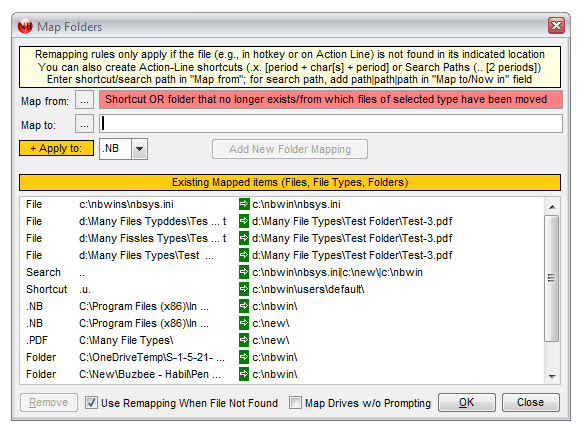
Nota Bene has long offered the option of having hotkeys/hyperlinks to all kinds of other resources, including web pages, as well as PDF files, images, and other Nota Bene files. When moving to a new system, sometimes the files being referenced are in a different location. NB 13 offers a simplified way of opening these files, even when their location has changed, without having to edit all the hotkeys/hyperlinks:
|
|
|
|
You can open/run multiple instances of Nota Bene at the same time:
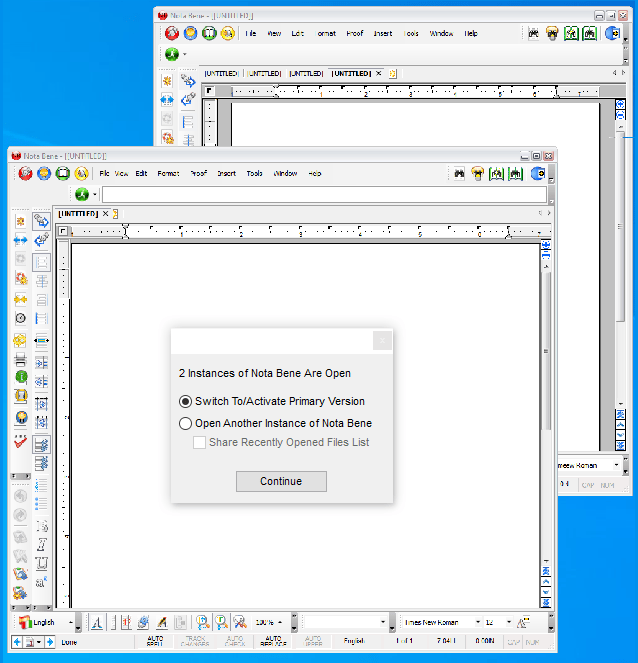 This allows Nota Bene to retain the various advantages of its original Multiple-Document Interface (MDI), while also being able to benefit, when needed, from a Single-Document Interface (SDI), but with a twist — each additional instance of Nota Bene allows you to open 36 windows from within it, giving you MDI-like options within an SDI interface! |
|
|
|
Improvements have been made to running Nota Bene on systems with multiple monitors:
|
|
|
|
Hundreds of improvements to the program -- ranging from tweaks to operationally significant ones -- make for a more satisfying experience in creating and editing. In version 13, the smallest changes can have a big impact on ease of use and smooth operation. Here are 13 of our favorite little improvements: |
|
When you drag the thumbnail/elevator on the scrollbar through a file, the display now moves with you, so that you can see the text at that location in the file in real time (and not only, as previously, when you stopped dragging)
| The vertical scrollbar also now includes buttons to:
| ||||||||||||||||||||||
|
It now takes a double click to open a header or footer — no more inadvertent opening of these elements when, for example, you click back into NB from another program
|
|
You'll no longer inadvertently delete an opened element (note, annotation, header/footer, etc.) ‐ the icons/options have beeen changed, and moved, so the default is effectively simply to close it
|
|
You can now get important information — file size, number of pages, full path and filename — about your active file just by hovering over the name on the tab workspace
|
|
The right click menu now works in the File Open/Save As dialog on Windows 10, even when not using the basic System Skin (View, Visual Appearance; this was a Windows issue, not specific to NB, but we've circumvented it)
|
|
In many places, behind-the-scenes distinct edits have been grouped together in a single unit, so undoing a multi-step operation will require fewer invocations of Ctrl+Z
|
|
It's now much easier to to select files for inclusion in a manuscript — you can use the standard File, Open dialog (with its access to Favorite folders), in multi-select mode
|
|
You can configure the speller (Proof, Configure Spell) so that auto expansion of abbreviations can now be activated regardless of your active language
|
| It's easeir to change indentation, and tab settings, in styles — if you hold the Ctrl key while you drag the relevant icons on the ruler line, the changes will be made to the active style (either the active framework/outline style [at the current level] or some other style you have defined and used [the active style at that place in your file]), rather than simply applying to the current paragraph
|
|
A new option has been added to the background color dialog that allows the background color you select to be printed
|
|
When inserting a new heading into a framework/outline document (either using Ctrl+Ins, or from the Options Bar [Alt+O]), you should no longer need to manually add or remove paragraph markers before or after the newly inserted heading
|
|
A new fancy line-drawing option has been added (Insert, Extended Line) for those who want to spice up a document by drawing a horizontal line &mdash you can specify thickness, color, and type (solid, dotted, dash-and-dot, etc.)
|
|
You can launch any executible program from within Nota Bene (Tools, Other Program options)
|
|
|
One of these little tweaks just might end up being your favorite new "feature" in the program.
|
|
|
|
You can now control how text wraps around frames (with or without images) that are narrower than the page width:

|
|
|
|
A number of changes have been made to track changes:
 |
|
|
|
We have added a Unicode font option to replace the Linguist Software fonts previously used in Lingua
|
|
|
|
An upgrade to Nota Bene 13 entitles you to on-going no-cost technical support (as long as it is the current Nota Bene release, as described in our support policy. |


 Note that while the base characters are the same in both modes (drawn from the active font), in the Linguist Software option the accents/modifiers are not taken from the actual font, but are instead either a generic serif (as in the first two examples above) or a generic sans serif (the last four cases above) font